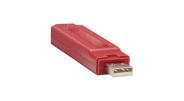
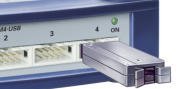
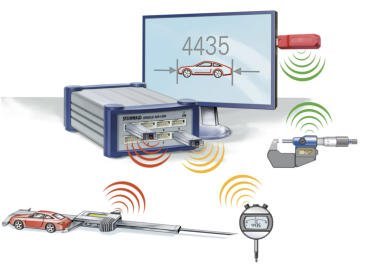
We connect your measuring equipment to your CAQ software
STEINWALD datentechnik builds interface systems that connect calipers, micrometers and gauges — regardless of manufacturer — to any quality-assurance, production-control or Excel software.
Tools for capturing readings into any PC software, including MS Excel
Connectivity from the caliper to inductive probes and PC-based measuring systems
Connect hand-held gauges or RS232-interface devices wirelessly
The DC-HI-NET interface system for measurement data acquisition in quality assurance
6Product lines
13Interfaces & protocols
up to 78Inputs cascadable
5Software tools
How it works
What does DC-HI-NET do?
DC-HI-NET interface systems connect gauges, controllers and machines using the common measuring-device interfaces and protocols — and pass the readings on to your software in a standardised form.
incl. compatibility with MarConnect, MULTIcom and DATA VARIABLE (DIGIMATIC family)
Forwarded to
CAQ (quality assurance)
SPC (process control)
MES (production control)
BDE (operational data capture)
Lab data processing
Statistics / MS Excel
The DC-HI-NET protocol: the advantages
The device-independent "DC-HI-NET" protocol handles convenient background functions, so simple commands are enough to bring pre-processed data into the host computer:
Recognises the gauge and adapts the transmission protocol
Communicates with the gauge, including parameter configuration
Converts gauge data formats into one unified format
Synchronised data capture via query of sync contacts
Buffered data storage in system memory
Dynamic pre-processing: maximum, minimum, range
Operations across gauge groups, e.g. for multi-channel measurements
Self-test and monitoring
DC-HI-NET MULTI —
the universal connector for DIGIMATIC/OPTO (standard), RS232/422/485 (option) and IW/bt/FUNK/digital I/O (option). "Automatic gauge recognition" lets you combine DIGIMATIC- or OPTO-/PROXIMITY-/POWER-interface devices on MULTI inputs without any extra configuration.
Products
Six DC-HI-NET product lines for every connection type
From the wired USB keyboard interface to wireless connectivity — each product line covers one PC connection type and a set of gauge interfaces.
DC-HI-NET SINGLE x-K
Data capture via USB keyboard interface
PC connection via USB keyboard interface (HID) for DIGIMATIC/OPTO/PROXIMITY/POWER and RS232, wireless optional. Transmits as keyboard code — driver-free into any software.
PC connection via USB (virtual COM port) for DIGIMATIC/OPTO/PROXIMITY/POWER, RS232/422/485, BCD/IEEE, incremental and I/O. Dynamic processing (MIN/MAX/range), multi-point measurement.
All variants
SINGLE M1-USBSINGLE M2-USBSINGLE M4-USBSINGLE M8-USBSINGLE BCD1-USBSINGLE I/O-USBSINGLE INCM2-USBSINGLE INC2-USBSINGLE INC4-USB
Cascading option: combine several SINGLE x-USB units, expandable to max. 78 inputs (not on M1/M2-USB).
DC-HI-NET SINGLE x-RS
Interface connection via RS232
PC connection via RS232 for DIGIMATIC/OPTO/PROXIMITY/POWER, RS232/422/485, inductive and analog. Powered via integrated PSU, robust metal housing.
All variants
SINGLE M4-RSSINGLE M8-RSSINGLE IP8-RS (IP65)SINGLE IND4-RSSINGLE IND8-RSSINGLE INDM8-RS
SINGLE IP8-RS rated IP65 for harsh environments. Cascadable up to 78 inputs.
DC-HI-NET IW
Connectivity for gauges with built-in radio
Receivers with built-in radio for Mahr i-wi, Helios-Preisser "i", Sylvac BT and Tesa TLC-BLE. Transmitters are managed on the receiver — no PC software from the gauge manufacturer needed.
SINGLE IW1-USBSINGLE IW2-USBSINGLE IW3-USBMULTI IW1MULTI IW2MULTI IW3
DC-HI-NET bt
Wireless data capture via Bluetooth® Smart
Manufacturer-independent transmitters for DIGIMATIC/MarConnect/OPTO/PROXIMITY/POWER and RS232, transmitted via Bluetooth® Smart (2.4 GHz). Optional remote trigger via foot switch.
Receivers: SINGLE bt-USB (up to 8 transmitters, max. 10 m) · MULTI bt
Compatible gauges (13)DC-HI-NET FUNK
Wireless data capture via radio
Like DC-HI-NET bt, but transmitted via radio (433 MHz) — ideal for longer range and many transmitters per receiver.
Receivers: SINGLE W (up to 78 transmitters, max. 20 m) · MULTI W (max. 5 m)
Compatible gauges (12)
+ RS232 interface: device-specific transmitter available on request.
Software tools
For data capture and device service
Five free tools bring readings into any PC software or MS Excel, and help with system testing, configuration and software integration.
MessBase light
Sends readings from a COM/USB-connected DC-HI-NET interface to the active window as simulated keyboard input.
Time-triggered capture, measurement sequence plan
Optional CSV logging
MessBase plus
Excel® sheet for importing readings from DC-HI-NET interfaces — including tolerance monitoring.
Graphical & numeric live display
Multi-point measurement incl. zeroing/offset
DCDemo32
Test and configuration software for DC-HI-NET interfaces, independent of the end-user application.
Live display, firmware update, error diagnosis
PRO32
Records the data stream from a gauge with an RS232 interface.
COM port configuration, log file, error diagnosis
Driver DLL
Dynamic Link Library (32/64 bit) for embedding DC-HI-NET communication into your own Windows applications.
MIN/MAX/DIFF values, digital I/O control, logging
Services
Support for customisation & commissioning
In-house interface adaptation
Development and testing of interfaces according to your specific requirements.
Billed per man-day · price on request
On-site service
Software adaptation, setup support, installation, commissioning and testing on your premises.
Billed per on-site working hour · price on request
Support & practical tips
So installation and operation run smoothly
Practical tips from real customer experience, personal advice and a free test program help with selection, installation and troubleshooting.
What environmental conditions do DC-HI-NET devices need?
In standard configuration, protect from moisture: ambient humidity 5–95% (non-condensing), operating temperature 0–50°C, no conductive particles or aggressive vapours. Splash-proof, climate-controlled special versions exist for harsh environments.
What should I watch for when cabling?
Only use STEINWALD data cables or cables approved by STEINWALD, self-twisted (15 turns/m) and shielded. Do not run parallel to power lines — if unavoidable, keep at least 50 cm distance (details: VDI/VDE 3551).
How do I avoid electrical interference?
Avoid mounting "DC-HI-NET" next to devices with strong interference (e.g. thyristor controls, contactors) or heavy heat output. Where unavoidable, add shielding plates or fans.
Is there a free test program?
Yes — the DC-HI-NET test program (DCDemo32) supports development, commissioning and testing, and is available for download on request. Technically interested users and software developers also receive detailed information on the DC-HI-NET protocol.
Download
Drivers & tools
We provide the following tools to our customers. Since they are updated regularly, we send current versions directly on request.
USB-/COM-Treiberfor SINGLE x-USB, IW-USB, bt-USB, W and RS232/USB converters on MS Windows®
DCDemo32 / PRO32Test and configuration software for DC-HI-NET interfaces, independent of the end-user application
TeamViewerfor remote access to your MS Windows® device during troubleshooting
It depends on your device's connection type: DC-HI-NET offers matching SINGLE and MULTI interfaces for DIGIMATIC, OPTO, PROXIMITY or POWER interfaces as well as RS232/422/485, BCD, IEEE, digital I/O, analog, inductive or incremental signals. Tell us your device type and we'll recommend the right model.
Do I need extra drivers for my CAQ software?
No. DC-HI-NET SINGLE x-K transmits readings as a simulated keyboard code (HID) — this works driver-free in any software that accepts text input (Office, CAQ, ERP, MES). SINGLE x-USB/x-RS use the STEINWALD protocol or a virtual COM port.
Can measuring devices be connected wirelessly?
Yes. Three wireless paths are available: DC-HI-NET IW for gauges with built-in radio (Mahr i-wi, Sylvac BT, Tesa TLC-BLE), DC-HI-NET bt via Bluetooth® Smart (2.4 GHz), and DC-HI-NET FUNK via 433 MHz radio — each with receivers for PC or STEINWALD interfaces.
How many gauges can run on one interface?
Depending on the model, 1 to 8 MULTI inputs directly. The cascading option lets you combine several SINGLE x-USB or SINGLE x-RS units for up to 78 inputs.
What does setup or customization cost?
In-house interface adaptation is billed per man-day, on-site service per working hour — both on request, since the effort depends on your specific CAQ/software environment.
Contact
Let's talk about your measuring equipment
Tell us about your gauges and your CAQ/software environment — we'll recommend the right DC-HI-NET interface.